MTO in your pocket. Track expiries, log field work with no cell service, watch for releasing claims, and generate your assessment reports — all from your phone.
Built specifically for BC mineral and placer claim holders — not a generic mining app.
Claim Dashboard
Live Tenure Map
Field Journal
Smart Alerts
Report Assistant
Team Access
9:41
My Claims
Action Required
Cariboo Creek No. 4
Title #1042891 · Expires May 1
1 day
Fraser Ridge Placer
Title #983210 · Expires May 7
7 days
Active Claims
Horsefly Mineral Claim
Mineral · 63 ha
Good To
Dec 12, 2026
Likely Creek No. 2
Placer · 42 ha
Good To
Mar 3, 2027
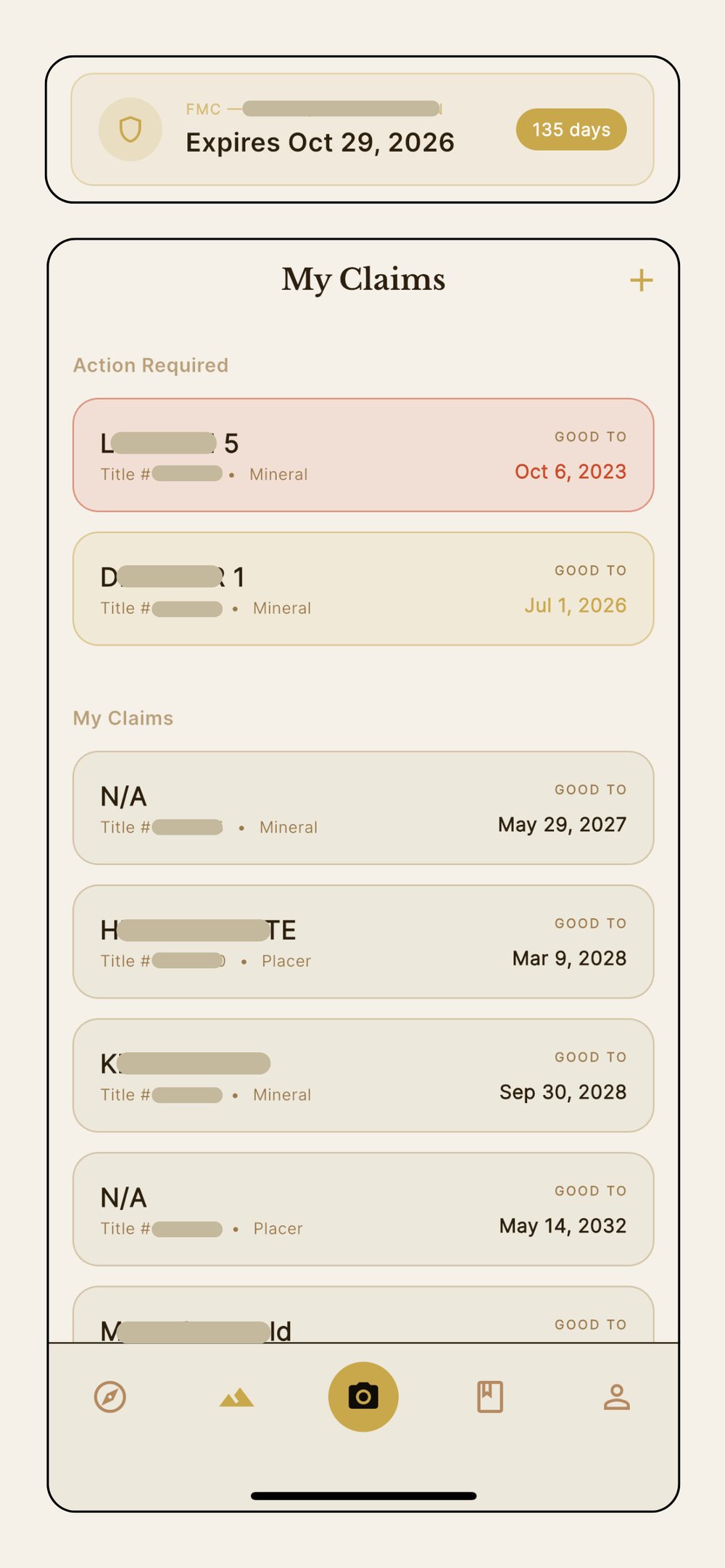
Claim Dashboard
All your claims. One glance.
Bedrock syncs with BC Mineral Titles nightly using your MTO Client Number. Every active claim loads automatically — expiry dates, countdowns, and action flags — so you always know what needs attention.
Auto-syncs from BC Gov WFS daily
Action Required section surfaces urgent claims
Cached locally — works without internet
9:41
Claim Status
Mineral (active)
Placer (active)
Exp. <30 days
Exp. <7 days
★
Watchlist
Claim Type
Cell
Legacy
Search claims...
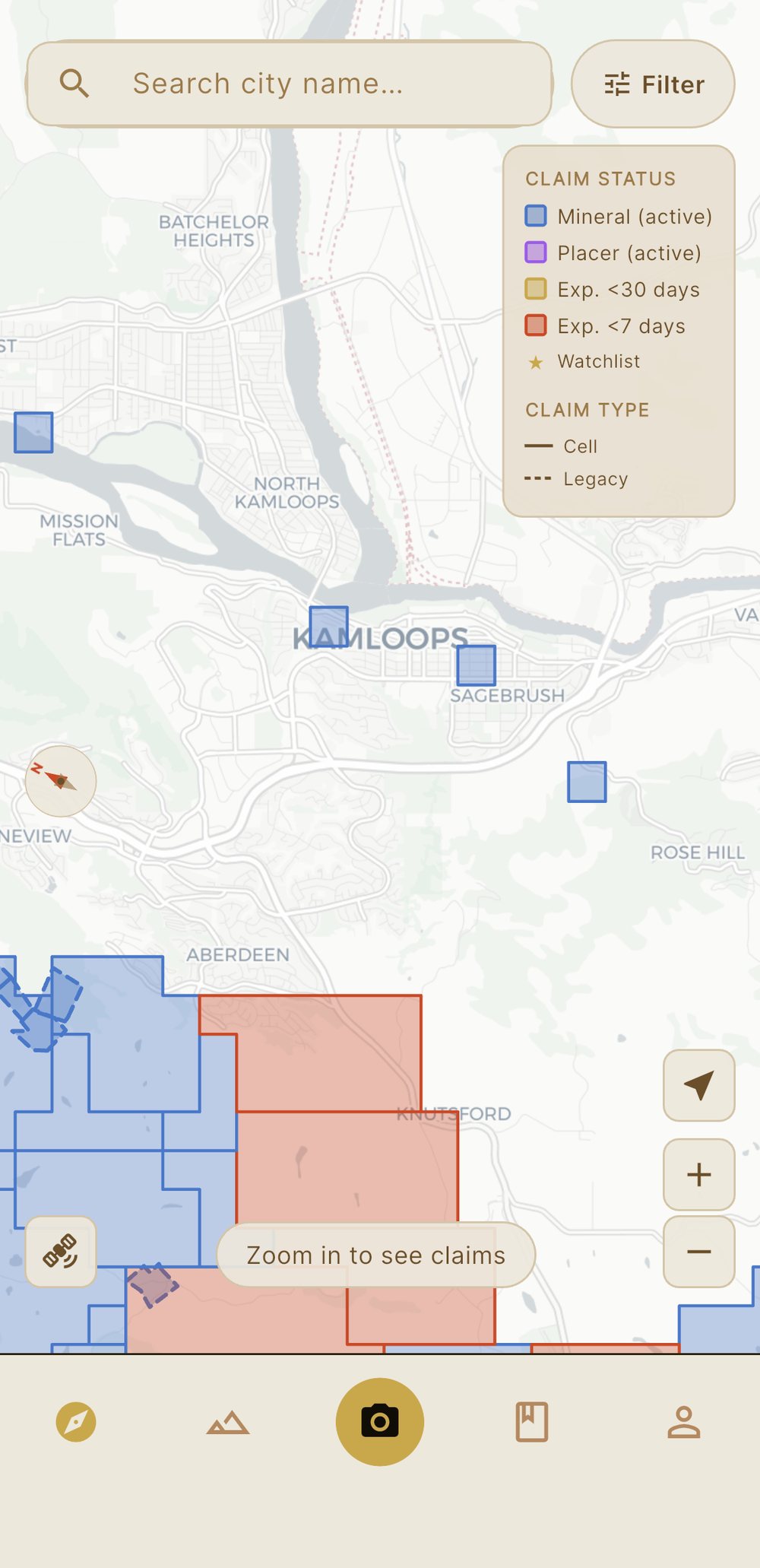
Live Tenure Map
BC's claim map. Finally on your phone.
Full BC mineral tenure layer, colour-coded by status. Cell claims solid, legacy claims dashed. Tap any polygon for details. Overlap disambiguation built in.
The map is FREE for everyone
Mineral and placer, clearly colour-coded
Cell and legacy claims rendered correctly
★ Watchlist overlay on any claim
Colour-coded backroad map and unclaimed grounds map
ARIS report and ground history search per claim
9:41
Field Journal
+ New Entry
2 entries pending syncWill sync on reconnect
All Claims
Cariboo Creek #4
Fraser Ridge
Horsefly
Today — Apr 26
Cariboo Creek No. 4
Sluicing — Upper Bench
6.5
HRS
5 photos
2 workers
Syncing
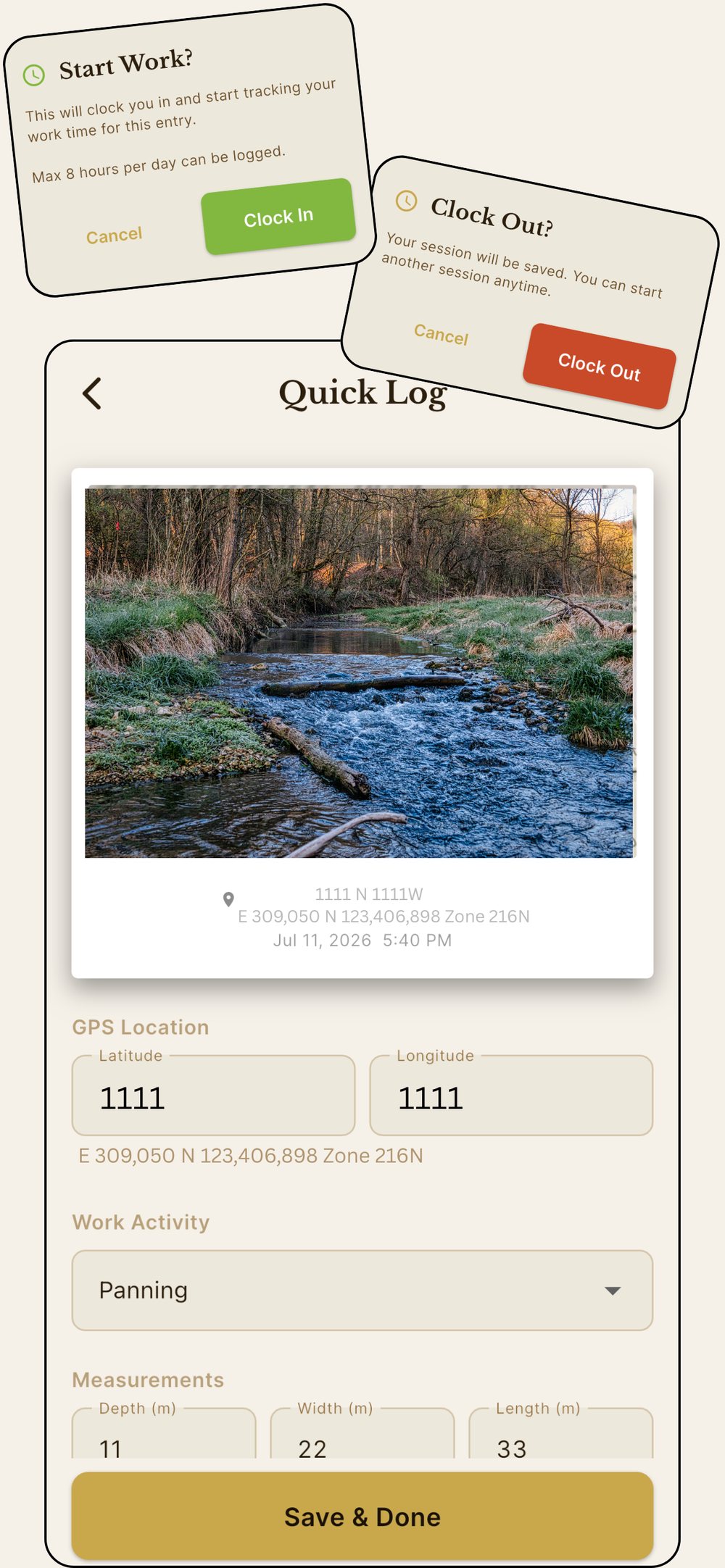
Field Journal
Log it in the field. Not later at camp.
Every entry saves to your device instantly — no signal needed. GPS and photo geotags happen automatically. Bedrock auto-calculates BC government assessment rates for labour and equipment as you log — no guessing, no spreadsheets.
Works 100% with no cell service
GPS auto-tagged on every entry and photo
Log hours, workers, equipment, receipts, notes, and samples for lab
Work costs automatically calculated using official BC government rates
Cash-in-Lieu tracking
9:41
BEDROCK · MINING CLAIMS
⚠️ Cariboo Creek No. 4 — 1 day left
Generate and submit your reports today
Fraser Ridge Placer — 7 days left
Report submission due May 7
BEDROCK · CLAIM ALERTS
⏰ Barkerville North's Good-to-Date is today
May become available — check MTO for current status
BEDROCK · CLAIM APPROVED
✓ Horsefly North approved
APPLICATION is now a CLAIM — work can begin
Smart Alerts
Never lose a claim to a missed deadline.
Four notification groups keep you ahead of every deadline. Bedrock knows when to be quiet and when to be urgent. Notifications silence automatically once you've submitted your reports.
Expiry reminders at 30, 7, and 1 day before your claim expiration date
Watchlisted claims alert you when their Good-to-Date arrives — check MTO to see if they become available
Post-MCCF ready — notified the moment your APPLICATION becomes a CLAIM
FMC expiry reminder so you never lose your certificate
9:41
Cariboo Creek No. 4
Reports Ready
Generated Apr 26, 2026 · 9:42am
Both reports generated
Review, then upload to MTO
Physical Work Report
BC Mineral Tenure Form · 2 pages
Preview
↓
Technical Report (ARIS)
Schedule A · 6 pages
Preview
↓
Smart Report Assistant
Your field notes. Turned into reports.
Bedrock synthesises your journal into a BC-compliant Physical Work Report and Technical Report (ARIS Schedule A). The cost statement is calculated automatically from BC government rates — not estimated. Generation happens on our servers, so losing signal mid-way won't lose your work.
BC Physical Work Report (PDF)
Technical Report in ARIS Schedule A format
Cost statement uses official BC government rates — always current, never estimated
Server-side generation — safe on spotty signal
9:41
Cariboo Creek No. 4
Shared Journal · 3 contributors
Cariboo Creek No. 4
Prospecting — Creek Bed
Working since 9:12am· Tap to Clock Out
Cariboo Creek No. 4
Sluicing — Upper Bench
by Sarah Mitchell
6.5
HRS
5 photos
Cariboo Creek No. 4
Trenching — South Face
by Ty Kowalski
8
HRS
3 photos
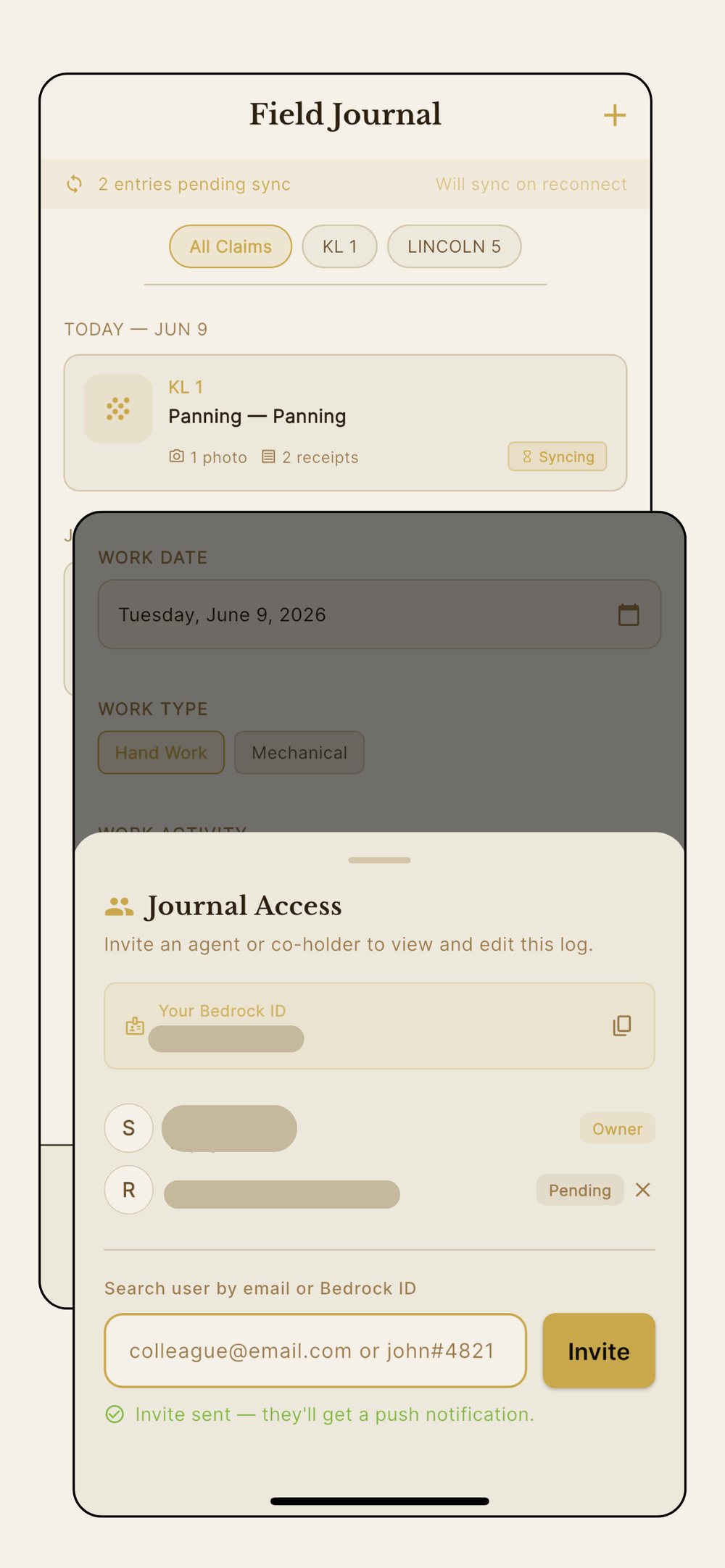
Team Access
Clock in. GPS proves it.
Clock in when you start, clock out when you're done — Bedrock timestamps it automatically, no manual entry. Pair that with a geotagged photo or GPS work site logged in the same entry, and you've got a record nobody can dispute: exactly where you were, exactly how long you worked. For claim owners, it means trusting the journal instead of policing it — invite an agent, contractor, or co-holder, and every entry they log is self-verifying.
Clock In / Clock Out — one tap logs exact hours and auto-fills the worker entry, capped at the 8-hour daily maximum
Timestamped automatically, GPS-tagged via photos and work sites logged in the same entry
Works for contractors, agents, co-holders — anyone you choose
Invited users log entries — claim owner generates the report
Revoke access anytime
Included in every Pro plan — no extra charge
The Real App
See Bedrock in the field.
The tenure map — mineral and placer, colour-coded
Every claim and deadline, one dashboard
Log field work, invite your team onto it
Clock in, clock out — hours tracked automatically
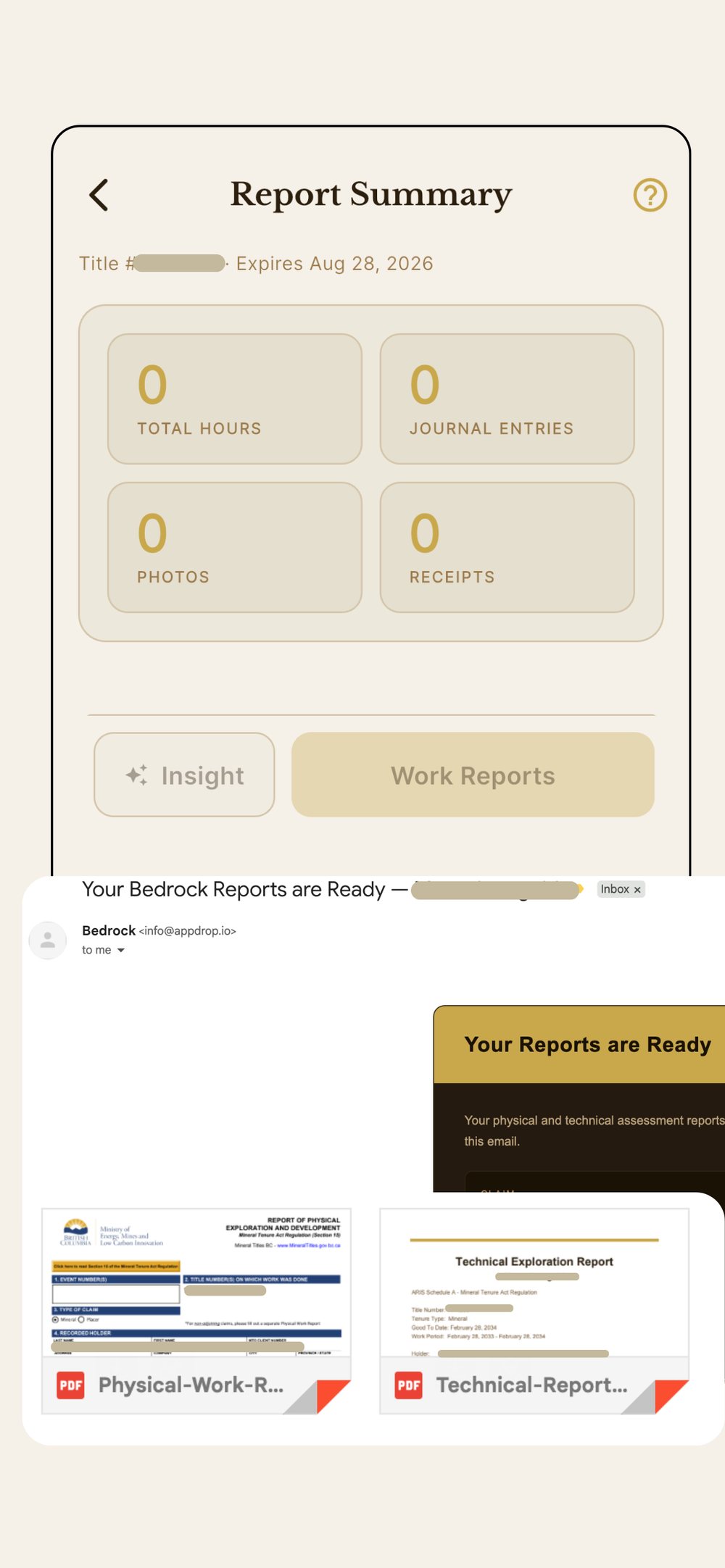
Generate reports — delivered straight to your inbox
Why Bedrock
Built for BC miners. Not adapted for them.
Other tools cover claim tracking as a side feature. Bedrock is the only mobile app built specifically for BC free miners — with everything in one place.
Feature
Competitors
Bedrock
BC claim expiry alerts
✅ email only
✅ push
Mobile app (iOS/Android)
❌
✅
Push notifications
❌
✅
Works with no cell service
❌
✅
GPS + photo field journal
❌
✅
Smart report assistant
❌
✅
Legacy vs cell claim map
❌
✅
Released claim alerts
✅ partial
✅
FMC expiry reminder
❌
✅
Post-MCCF claim approval alerts
❌
✅
Team shared journal
❌
✅
Work hours valued using BC official assessment rate guidelines
❌
✅
Mineral sample logging + lab submission form
❌
✅
How it works
Set up in minutes. Runs itself after that.
1
Sign in and enter your MTO Client Number
Sign in with Apple or Google. Enter your MTO Client Number and FMC expiry date. Bedrock automatically loads all your active claims from BC Mineral Titles.
2
Log your field work as you go
Each day in the field, open the journal and log hours, work type, and photos. GPS tags automatically. Everything saves locally — no signal required.
3
Get notified before anything expires
Bedrock reminds you at 30, 7, and 1 day before each claim's expiration date, and before your FMC expires. No more surprises at midnight.
4
Generate and submit your reports
Tap Generate Reports. Bedrock turns your field journal into a complete Physical Work Report and Technical Report, work hours valued using BC official assessment rate guidelines, ready to upload directly to MTO.
Pricing
The smartest investment a BC miner can make.
Professional assessment report writers charge thousands per report. Bedrock does it for you, unlimited, all year. Plans start at $99 CAD/year.
Free
Explorer
Browse the BC tenure map instantly. Free sign-up, no credit card needed.
1 month free · Cancel anytime in App Store or Google Play
FAQ
Common questions.
How is Bedrock different from Mineral Titles Online (MTO)?
MTO is the BC Government's official registry system — it's where you stake claims, pay fees, renew your FMC, and submit work reports. It's a web-based transaction system and MTO remains the authoritative source of record for all mineral titles in BC. Bedrock is a field companion app built around how miners actually work — with no cell service in the bush, phone in pocket, far from a desk. Bedrock helps you track deadlines, log field work as you go, automatically calculate your cost statement using BC official rates, and generate your Physical Work Report and Technical Report so you're ready to submit when the time comes. Think of MTO as the land title office and Bedrock as your field notebook and report writer combined. We are aware that BC Mineral Titles is actively developing MTO2, a modernised replacement for the current system tentatively launching in early 2027. We're following its development closely and will ensure Bedrock stays fully compatible as the new system rolls out.
Everyone should install Bedrock, not just miners.
We agree. The map is completely free. If you hike, camp, prospect, or explore anywhere in BC, knowing where active mineral claims are is important. Working or panning on someone else's claim without permission is claim jumping — and it's treated seriously under BC law. It's considered theft under the Criminal Code of Canada, carrying 2 to 10 years in prison, plus a $25,000 fine, loss of your Free Miner Certificate, and potential seizure of your equipment and vehicle. Beyond the legal risk, it's a betrayal of a community built on hard work and mutual respect. Bedrock's map makes it easy for anyone to see exactly what's claimed, what's available, and what's expiring — so you can explore BC with confidence and respect the ground other miners have worked for.
Does Bedrock use AI?
Yes — and we want to be upfront about it. Bedrock uses AI to assist with the written sections of your Physical Work Report and Technical Report. The goal is simple: miners should be spending their time in the field, not buried in paperwork. We handle the write-up load so you can focus on the work. The cost statement is calculated from official BC government rates — not estimated by AI. You review everything before it goes anywhere near MTO.
Is the data from BC Mineral Titles accurate and up to date?
Bedrock pulls claim data directly from the BC Government's public mineral tenure data service, updated nightly. Bedrock is not affiliated with BC Mineral Titles — MTO remains the authoritative source of record. We always show you when data was last synced so you know exactly how current it is.
Will the generated reports be accepted by MTO?
Bedrock generates reports using the official BC Physical Work Report form and follows the requirements of the Mineral Tenure Act Regulation Section 15 and Information Update No. 8. Work costs are calculated using BC government assessment rate guidelines. That said, you are the recorded holder and responsible for reviewing the report for accuracy before submitting. Bedrock walks you through a checklist before you download.
What happens if I lose signal while generating a report?
Nothing is lost. Report generation happens on our servers, not your device. If you lose signal after tapping Generate, the server keeps running and finishes the job. Just reconnect whenever you're back in range and your completed reports will be waiting.
Does my field journal work without internet?
Yes — completely. The field journal is built to work with no cell service. Log hours, take geotagged photos, add notes and receipts with zero signal. Everything saves instantly to your device and syncs to the cloud automatically when you reconnect. GPS works natively on your phone with no internet required.
How does team journal access work?
As a claim owner you can invite any Bedrock Pro user to log journal entries on your claim — an agent running surveys, a contractor doing sluicing work, or a co-holder. Just enter their email or Bedrock username and send the invite. Once they accept, they can log field work, photos, and hours on your claim. You stay in control — you generate the reports, and you can revoke access anytime. Their logged entries feed directly into your Physical Work Report and Technical Report. For contractors, this doubles as a verifiable timesheet — hours logged in Bedrock, report generated, work proven.
Can I log rock samples and send them to the lab?
Yes. Within each journal entry you can log individual samples — rock, soil, stream sediment, or concentrate. Bedrock captures the GPS coordinates, your geological description, target minerals, approximate weight, and before/after photos. When you're ready to send samples to the lab, tap Export Sample Form and Bedrock generates a Bedrock Mineral Sample Submission Form PDF with all your samples, photos, and locations included. Send it along with your physical samples. When assay results come back, log them in Bedrock and they'll be included in your next Technical Report automatically.
What is MCCF and why does it matter?
Since March 2025, all new BC mineral claims go through the Mineral Claims Consultation Framework — a First Nations consultation process — before being granted. This means after you purchase a claim it sits in APPLICATION status for weeks or months before you can legally begin exploration work. Bedrock tracks this status and notifies you the moment your APPLICATION becomes a CLAIM so you know exactly when you can get started.
Why is Bedrock only available as a mobile app?
Because the work happens in the field, not at a desk. Bedrock is built around the moments that matter — logging hours after a day of sluicing, taking a geotagged photo of a rock sample, capturing GPS at a work site with no signal. Those things only make sense on a device in your pocket. In Phase 1 we're focused entirely on getting the mobile experience right. Our roadmap includes a web app for reading and downloading your reports, but the core logging, journaling, and field tools will always live on mobile where they belong.
Real BC miners have signed in to Bedrock since launch
Latest Release
v1.8.0+54
⛏️ Work requirement tracker: Report Summary now shows how your logged labour compares with the year's assessment work requirement. It estimates how many days it could add to your claim, and tapping the card shows the math
📔 Journal improvement: you can edit an equipment rate, and edit entries; you can edit Transportation entries, and aircraft now takes a charter cost
📍 Reports: GPS coordinates now open in the correct DD format on the Physical Work Report